
















AI Agent Orchestration: How Multi-Agent Workflows Work In Practice

KEY TAKEAWAYS:
- AI agent orchestration is the control layer for agentic workflows. It routes tasks, manages context, limits tools, records evidence, and decides when a person or deterministic rule must take over.
- Start with one agent and a measurable workflow. Add more agents only when specialization, parallel work, separate permissions, or review improves a known limitation.
- Reliable orchestration depends on typed handoffs, bounded state, least-privilege tools, stop conditions, approval gates, and end-to-end traces.
- Frameworks such as LangGraph, CrewAI, AutoGen, Semantic Kernel, and LlamaIndex solve different coordination problems. Architecture and operating rules still matter more than the framework name.
- Move from prototype to production through shadow mode, low-risk actions, evaluation, rollback, and a clear human fallback.
AI agent orchestration gives a business workflow a clear owner for routing work between agents, tools, systems, and people. It defines who acts, what context they receive, which actions are allowed, and how the run ends.
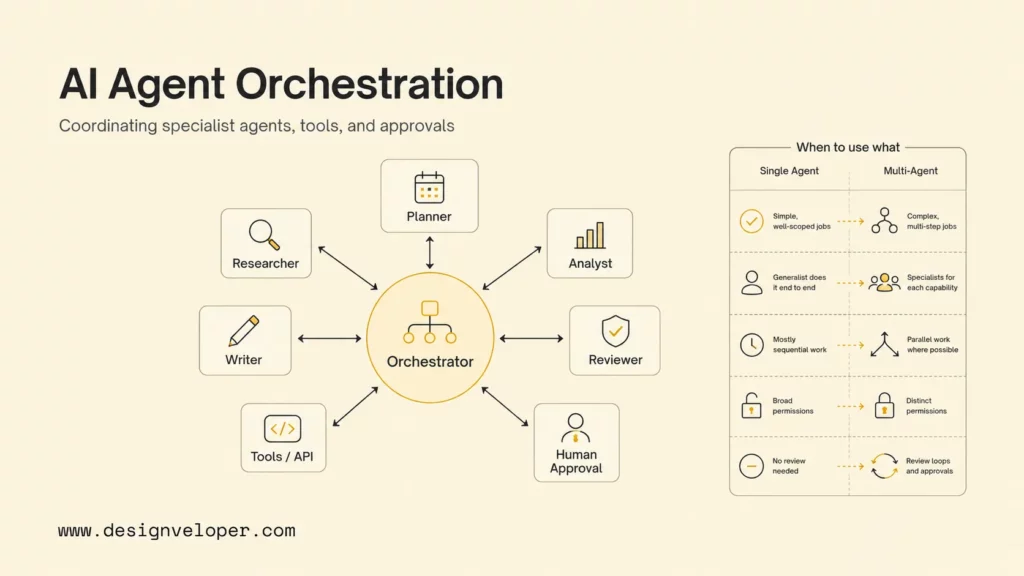
Start with one agent when one role can complete the job with one coherent context and tool set. Add specialists only when the workflow has independent work, changing routes, separate permissions, or a review step that is easier to test in isolation.
Recommended for you:
- How To Build An AI Agent: A Practical Step-By-Step Guide
- AI Agents vs Agentic AI: Differences From Execution to Autonomy
- LLM Vs AI Agent: Differences, Use Cases, And When To Combine
What Is AI Agent Orchestration?
AI agent orchestration is the control layer that plans, routes, executes, reviews, and records work across agents and the systems they can access. Each worker has a purpose, instructions, tools, knowledge sources, model, and permission scope. The control layer connects those roles without giving every worker the same context or authority.
The design also depends on the roles inside the system. Reviewing the different types of AI agents helps a team separate a retrieval worker, planner, action worker, and reviewer before assigning tools or permissions.
An orchestrator can be a deterministic workflow, a supervisor agent, or a hybrid. Rules may handle identity checks, amount limits, retries, and state changes. A model may interpret an ambiguous request, choose a specialist, or summarize evidence. The safest systems keep high-impact decisions inside explicit policy gates.
Orchestration is different from placing several agents in one shared chat. A production system must represent the task, define ownership, validate handoffs, control tool access, stop loops, retain evidence, and recover from partial failure. A shared conversation without those controls is collaboration, not a reliable operating workflow.
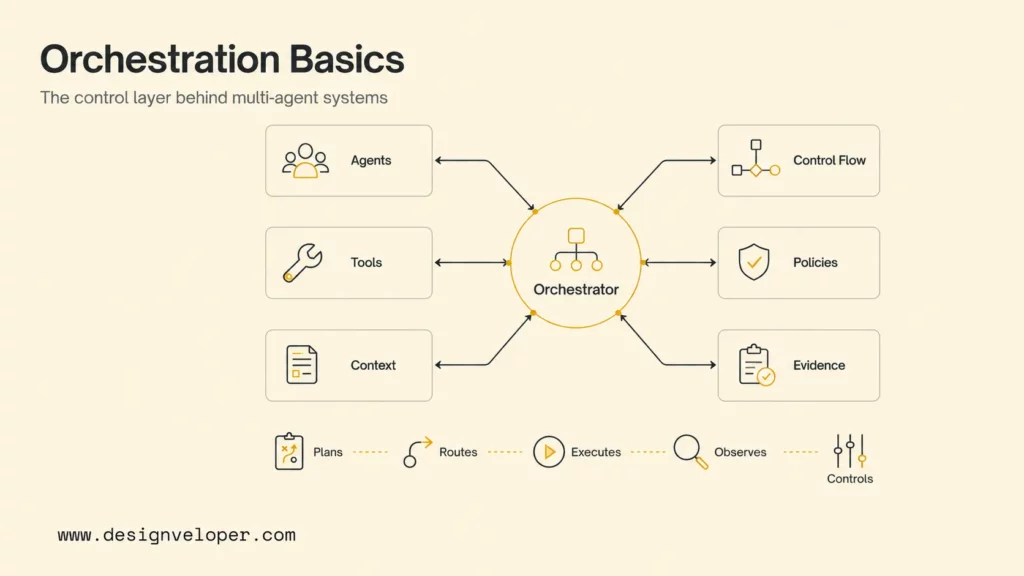
- Agents: perform bounded tasks such as retrieval, analysis, drafting, calculation, or review. Define each role’s purpose, input, output, model, owner, and permission scope.
- Tools: connect the workflow to search, APIs, databases, files, or business systems. Use allowlists, parameter validation, identity checks, rate limits, and clear write rules.
- State: stores the facts, decisions, evidence, approvals, and status of a run. Define its schema, source, version, retention, and field ownership.
- Control flow: moves work through branches, loops, parallel steps, handoffs, and retries. Set stop conditions, timeouts, budgets, escalation, and compensation behavior.
- Policies: define permissions, data filters, spending limits, content rules, approval gates, and escalation paths. Keep these controls outside the model’s informal instructions where possible.
- Evidence: explains why a route, action, or final answer was produced. Record the correlation ID, trace, tool result, policy result, cost, and outcome.
A useful rule is to pass structured facts instead of forwarding an ever-growing transcript. A customer-support workflow might share an order ID, eligibility status, evidence links, refund amount, confidence, and approval state. The drafting agent does not need the research agent’s full hidden reasoning or unrelated customer history.
How AI Agent Orchestration Works In Practice
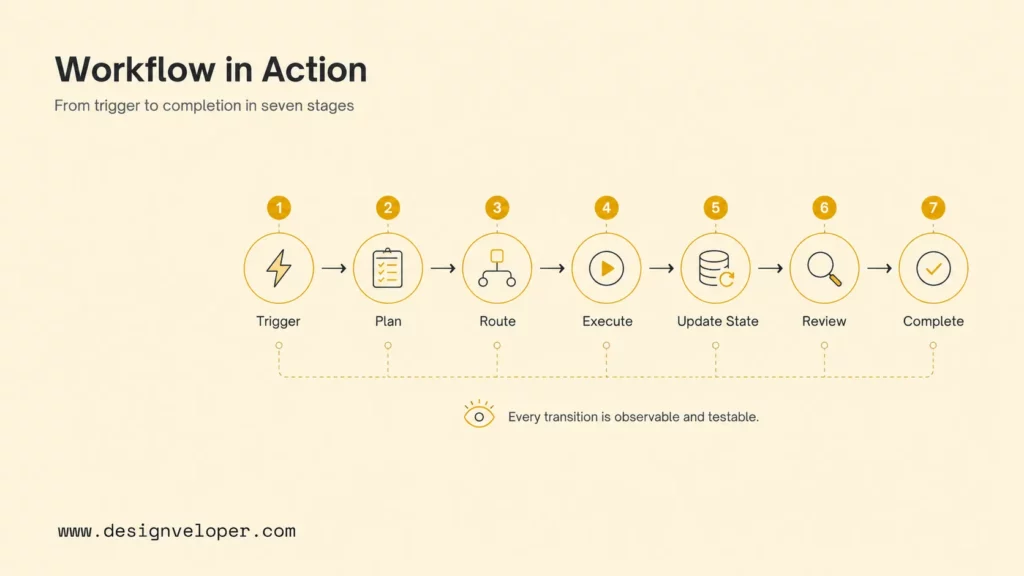
A multi-agent run usually moves from a trigger to a controlled result. The path may be fixed, selected by a router, or adapted by a supervisor. Every transition should be observable and testable, even when a model chooses the next worker.
Consider a support ticket that asks whether an order qualifies for a refund. The workflow should not let a general assistant read everything and call the payment API directly. It can authenticate the requester, retrieve order facts, check policy, draft a recommendation, request approval above a threshold, then execute an idempotent refund and notify the customer.
- Trigger: create a run after a user request, event, or schedule. Store the authenticated ticket and run ID.
- Plan: validate the goal and split it into typed tasks such as order lookup, policy check, calculation, and drafting.
- Route: select the right specialist, function, or execution path. Keep routing reasons observable.
- Execute: call tools with bounded identity and validated parameters, such as read-only CRM access and a refund proposal.
- Update state: store approved facts and evidence, including eligibility, amount, source records, and confidence.
- Review: apply policy checks or human approval to risky outcomes, such as a refund above the automatic limit.
- Complete: perform the approved action, respond, close, or escalate. Record the result and audit trail.
Handoffs need contracts. Each contract should name the receiving role, required input, expected output schema, deadline, confidence or uncertainty, and escalation route. Add a maximum handoff count when two workers could send work back and forth. A missing stop condition can turn a small routing mistake into a long and expensive loop.
Memory also needs boundaries. Current workflow state contains facts needed for this run. Long-term memory contains approved information that may affect future runs. Define the source, owner, retention period, correction path, and deletion rule for both. Treat an agent’s unverified narrative as a proposal, not as a trusted fact.
A simple AI agent architecture diagram can make these boundaries visible: show the orchestrator, worker identities, state store, tools, approval service, and system of record on the same workflow map.
For a broader implementation view, see the Microsoft AI agent design patterns guide. It reinforces a practical principle: use the lowest level of complexity that reliably meets the workflow requirement.
For practical examples:
- How to Build Agentic AI: Practical Guide with Examples
- Agentic AI in Action: 7 Real Life Use Cases and Examples
- MCP vs AI Agent: How They Work Together
Orchestration Vs Choreography Vs Workflow Automation
These terms describe who owns the next step. Workflow automation follows predefined rules. Orchestration gives one coordinator responsibility for routing and completing a run. Choreography lets agents or services react to events without one central coordinator deciding every transition.
| Approach | Who Chooses The Next Step | Best Fit | Main Trade-Off |
|---|---|---|---|
| Workflow automation | Rules, a state machine, or a workflow service | Stable approvals, scheduled jobs, repeatable business processes | Less flexible when inputs or routes change |
| Central orchestration | One workflow engine, router, or supervisor | Specialist handoffs, shared progress, approval gates, and one completion owner | The coordinator can become a bottleneck or broad authority |
| Event choreography | Each participant reacts to published events | Loosely coupled domains, asynchronous work, and local ownership | Global state, ordering, debugging, and duplicate events are harder to control |
| Hybrid workflow | Rules own critical transitions; agents interpret or propose within selected steps | Production systems that need both flexibility and deterministic safety | Requires clear boundaries between model decisions and code-owned state |
A refund workflow can use a central orchestrator for identity, policy, approval, and completion, while an event announces that a refund was issued. A document platform can let extraction and indexing react to upload events, but keep access, signature, and retention transitions inside a controlled workflow. The right choice depends on who must see the whole run and who owns the final state.
Durable execution matters when work can pause, retry, or wait for a person. Persist a run ID, state version, event ID, current owner, deadline, approval status, and compensation action. Make writes idempotent so a retry does not create a second payment, duplicate message, or conflicting record. Treat the message envelope as part of the architecture, not as an informal prompt between agents.
Explore more:
- AI Agent Vs Chatbot: Key Differences, Use Cases, And Best Fit
- AI Agent Vs AI Assistant: Differences, Use Cases, And Choice
- What Is Agentic AI? Benefits, Architecture and How It Works
Common AI Agent Orchestration Patterns
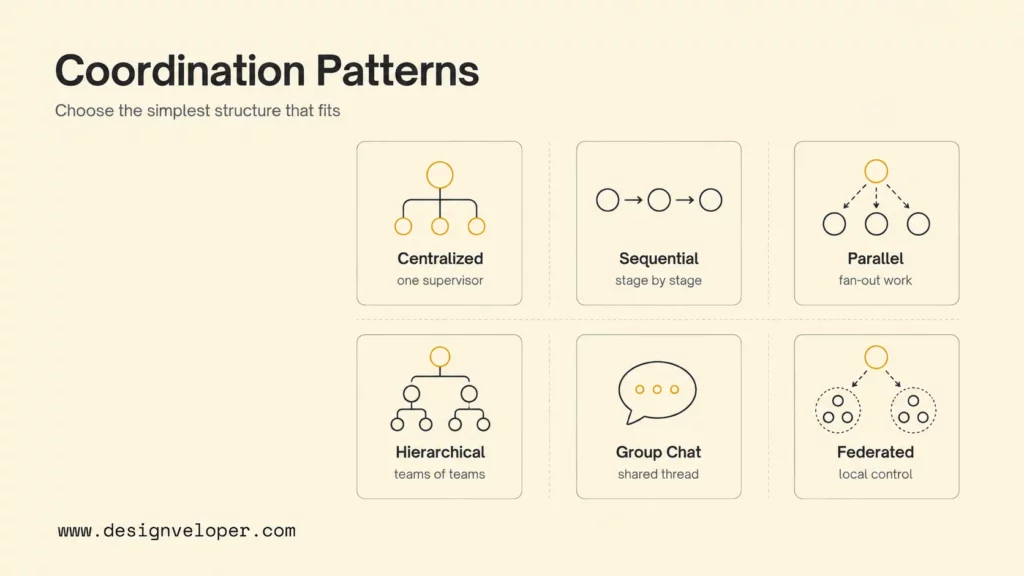
Choose a pattern from the dependency structure, not from the framework demo that looks most impressive. The main questions are whether work is sequential or independent, whether routing is predictable, how much shared context is needed, and which role owns the final state.
- Sequential chain: use it when each stage depends on the last validated result. Add a checkpoint after every stage because early errors can propagate and increase latency.
- Supervisor-worker: use it when specialists need one planning and synthesis point. Limit the supervisor’s credentials so it does not become a broad authority or bottleneck.
- Parallel fan-out: use it for independent research, analysis, voting, or extraction. Define conflict rules, partial-timeout behavior, duplicate-evidence handling, and one final owner.
- Handoff or swarm: use it when the next specialist emerges during the interaction. Set ownership and handoff limits to prevent loops.
- Review loop: use it for maker-checker work such as document drafting, code review, or policy analysis. Set a maximum number of rounds and a concrete acceptance test.
- Hierarchical or federated: use it when large domains need local control and team-level coordination. Expect more work for permissions, tracing, and cross-team state.
AI Agent Orchestration Frameworks And Tools
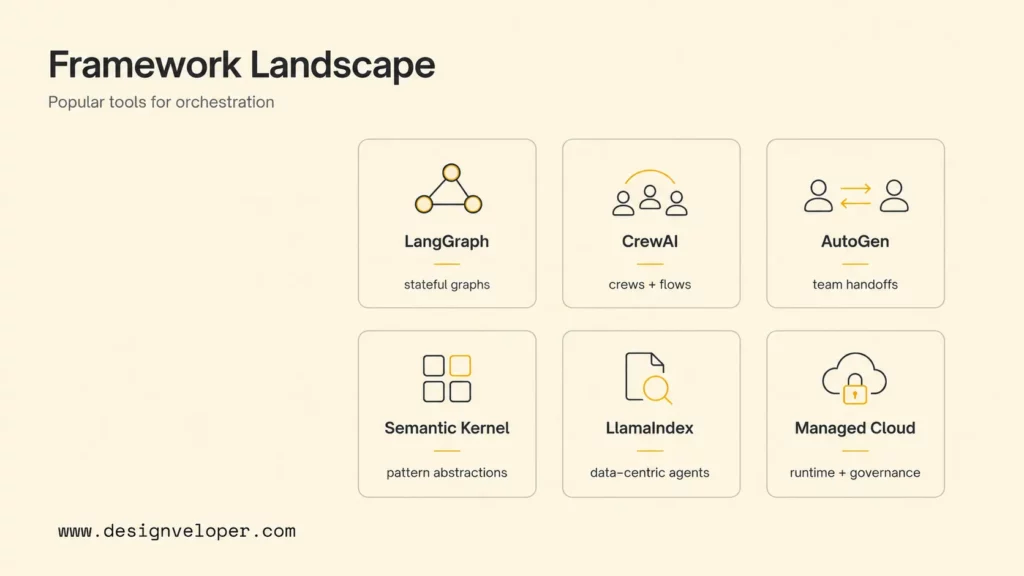
Framework selection should follow the workflow’s state model, language, deployment environment, and operating needs. A framework can provide graph control or team abstractions, but it does not define your permissions, data ownership, evaluation set, incident process, or business approval rules.
For larger teams, the same decision sits inside an enterprise AI agent operating model, where identity, governance, observability, and system ownership matter as much as the agent framework.
| Option | Best For | Check Before Adoption |
|---|---|---|
| LangGraph | Stateful graphs that mix deterministic and agentic steps | Persistence, interrupts, replay, deployment, and team support |
| CrewAI | Role-based crews inside structured, event-driven flows | State ownership, failure recovery, tracing, and version stability |
| Microsoft AutoGen | Conversational teams, selector routing, and handoffs | Round limits, tool permissions, evaluation, and production runtime |
| Semantic Kernel | Microsoft-oriented applications using named orchestration patterns | Experimental features, language support, and upgrade behavior |
| LlamaIndex | Retrieval, documents, and structured knowledge workflows | Connector ownership, retrieval quality, state persistence, and cost |
| Managed cloud runtimes | Teams that need hosted sessions, scaling, monitoring, and identity | Regions, service lifecycle, portability, quotas, and data controls |
LangGraph and LangChain custom workflows fit teams that want visible nodes, branches, loops, parallel paths, and agent steps inside a larger graph. Use this approach when state transitions need to remain explicit and inspectable.
CrewAI separates role-based Crews from stateful Flows. That distinction is useful when specialist collaboration belongs inside a broader business process with triggers, branching, resumability, and a known completion state.
AutoGen teams support patterns such as selector-based group chat and handoff. Keep turn counts, tool access, and completion conditions explicit because conversational teams can otherwise grow without a useful result.
Semantic Kernel agent orchestration documents sequential, concurrent, handoff, group chat, and magentic patterns. Its documentation currently marks several orchestration capabilities as experimental, so pin versions and test upgrades before production use.
LlamaIndex multi-agent workflows suit retrieval-centered products where data connectors, documents, and knowledge access are central to each worker’s job. A data-heavy workflow still needs source permissions and evidence checks.
Managed services can reduce platform work, but service lifecycle and regional limits matter. For example, Google’s managed agent platform documentation covers scaling concerns that teams should assess alongside sessions, deployment, evaluation, tracing, and monitoring. Validate portability, data location, quotas, and exit options before making a hosted platform the center of the product.
For a Designveloper-focused framework comparison, see Best AI Agent Frameworks For Building Smarter AI Systems.
How To Implement AI Agent Orchestration Step By Step
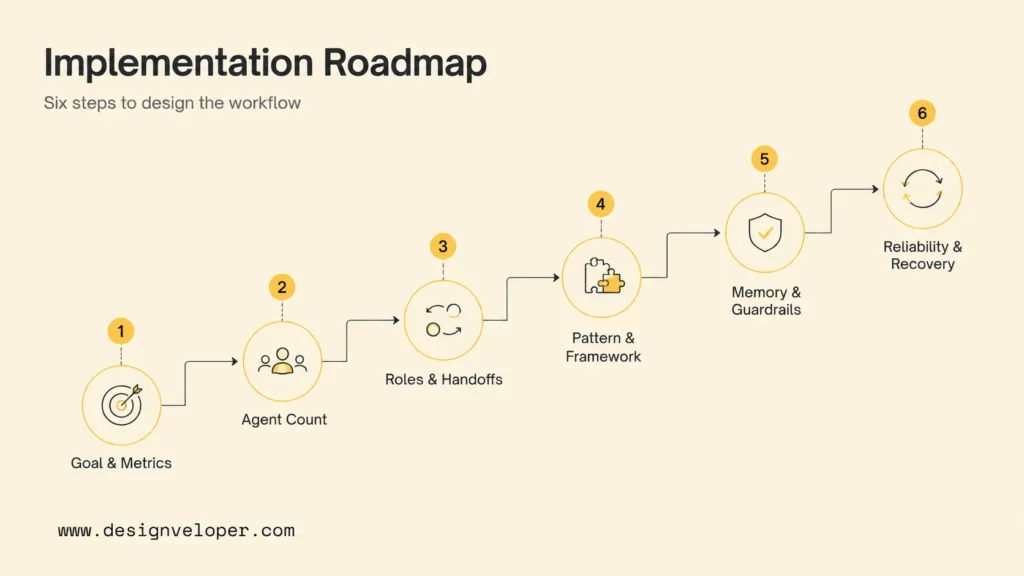
Implementation should begin with a business workflow and a measurable success definition. The six steps below help a team move from an agent demo to a controlled system.
Related reading:
- AI Agent Governance: How To Manage Agents In Production
- Agentic AI Security: Risks, Core Architecture, Solutions
- How To Build AI Agents with LangChain: The Complete Guideline
Step 1. Define The Workflow Goal And Metrics
Write one sentence that names the trigger, user, outcome, and boundary. For example: “When a support ticket requests a refund, produce an evidence-backed eligibility decision and draft a response, but require a supervisor before payment above the automatic limit.”
Measure the outcome, not the number of agent calls. Useful metrics include completion rate, human correction rate, policy violation rate, escalation accuracy, action reversal rate, p95 latency, cost per accepted run, and user acceptance. Compare the multi-agent design with the existing human or single-agent baseline.
Step 2. Test One Agent First
Prototype the narrowest useful single-agent workflow. Add another agent only when evaluation shows a specific limitation, such as conflicting tool instructions, context overload, a separate permission boundary, independent parallel work, or a genuine reviewer role.
A router does not always need to be an agent. Stable categories can use rules or a small classifier. Deterministic routing reduces cost and makes failures easier to reproduce.
Step 3. Define Roles, Tools, And Handoffs
Give each role a compact contract: purpose, allowed inputs, output schema, tools, data scope, permissions, timeout, retry policy, prohibited actions, and escalation route. Avoid two generalist agents with the same sources unless the workflow explicitly needs independent review.
A policy worker might return eligible, reason_code, evidence_ids, confidence, and requires_human. The next worker receives those fields and validated evidence, not a full transcript.
A useful handoff envelope also carries the run ID, parent task ID, schema version, source timestamp, deadline, retry count, and permission scope. Validate the envelope before routing it. If the worker cannot meet the contract, return a typed failure or escalation rather than silently inventing a missing field.
Step 4. Map Dependencies And Choose The Framework
Draw the workflow before choosing a library. Mark which tasks are dependent, which can run in parallel, which route needs model judgment, and which state changes require one writer. Then test the framework with a production-shaped slice that includes persistence, cancellation, timeouts, streaming, human interrupts, tracing, and recovery.
Step 5. Add Permissions, Memory, And Approval
Give each agent its own identity and least-privilege access. A research worker may read public sources, a CRM worker may read selected customer fields, and an action service may write only after approval. Apply checks at input, tool request, tool response, state update, and final output.
Place human review at the point of consequence. Show the reviewer the proposed action, evidence, policy result, affected record, and exact permissions. Approval should be a meaningful decision with an audit record, not an unexplained “continue” button.
Step 6. Evaluate Failure, Cost, And Recovery
Build an evaluation set from normal requests, ambiguous inputs, hostile instructions, tool failures, incomplete data, conflicting worker results, and policy boundaries. Test workers, handoffs, routing, aggregation, and the complete workflow. A worker can pass alone while the orchestration fails because state was lost or the wrong specialist was selected.
- Reliability: completion, schema validity, retry behavior, and recovery after partial failure.
- Cost: model calls, token volume, tool charges, duplicate work, and cost per accepted outcome.
- Latency: p50 and p95 duration, slow workers, queue time, and approval wait time.
- Safety: permission denials, prompt injection resistance, data filtering, and approval bypass tests.
- Operations: tracing, alerts, replay, cancellation, reconciliation, and version rollback.
Cost planning should include more than model tokens. An AI agent pricing framework can help teams account for tool calls, hosted runtimes, observability, human review, retries, and ongoing maintenance.
Practical AI Agent Orchestration Examples
Real workflows make the architecture easier to evaluate. Each example below uses agents for interpretation or specialization, while deterministic services control permissions, records, and high-impact actions.
Customer Support Refund Workflow
A triage worker classifies the request, an order worker retrieves the relevant records, and a policy worker checks eligibility. A calculation service produces the amount. A response worker drafts the explanation. The payment API remains behind an approval and idempotency gate.
This pattern matches common AI agent customer service workflows, but orchestration must still keep customer identity, refund limits, and the payment write outside the model’s direct authority.
The useful learning is separation of proposal and action. Agents can collect evidence and draft a recommendation, while code enforces amount limits, identity, duplicate-request checks, and the final write.
Document Review And Signature Workflow
An extraction worker identifies fields, a policy worker checks required clauses, and a reviewer worker lists missing information. A human approves the final version before the signature service sends it. Each finding should retain a page reference or source excerpt so the user can check it.
This is a practical document intelligence workflow: extraction can be automated, but the evidence, permissions, review state, and final signature still need explicit ownership.
Designveloper has experience delivering document-centric collaboration products with PDF tooling, signature workflows, and AI-assisted document tasks. That capability is relevant when orchestration must connect document understanding to permissions, review, and a traceable business action. See the public document collaboration and digital signature project example.
Finance Assistant Workflow
An intake worker extracts fields from a receipt or statement, a classification worker suggests an account or tag, and a reporting worker answers a natural-language question from approved records. The system should create drafts or suggestions first, then require confirmation for edits, deletions, or financial actions.
Designveloper has experience building AI-assisted finance workflows that extract transaction data, organize records, and support defined natural-language actions. The safe lesson is capability-led: the assistant should help with structured tasks while keeping review, source evidence, and user control visible. See the public AI-oriented personal finance assistant project example.
Internal Operations Workflow
An employee request can pass through a retrieval worker, a policy worker, and an approval worker before the system updates an HR or operations record. The workflow should expose the policy source, effective date, owner, and approval status instead of returning an unsupported yes-or-no answer.
Workflow-heavy HR software is a useful reference for this pattern because the value comes from connecting roles, records, permissions, and approvals. The agent should assist the process rather than replace the system of record.
AI Agent Orchestration Challenges And Controls
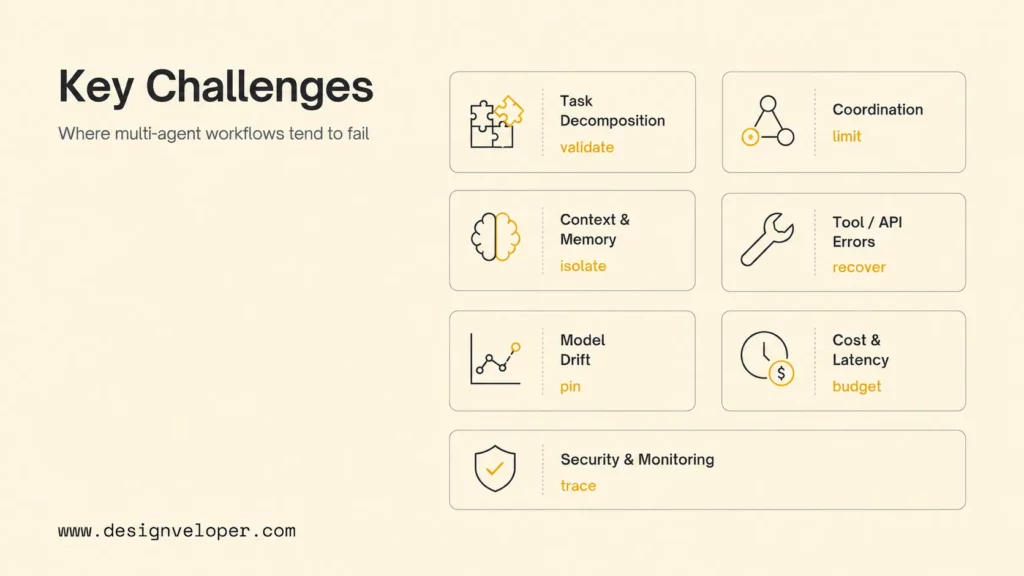
Multi-agent systems add distributed-system failure modes to model uncertainty. The strongest controls are concrete: narrow roles, typed state, least privilege, budgets, stop conditions, and traces that connect the complete run.
| Challenge | What It Looks Like | Control |
|---|---|---|
| Poor decomposition | Duplicate work, missing steps, or tasks no worker can verify | Typed task contracts and deterministic validation before routing |
| Coordination failure | Wrong specialist, handoff loops, dead ends, or conflicting outputs | Routing reasons, handoff limits, and conflict rules |
| Shared-state problems | Stale facts, context bloat, leakage, or overwritten records | Isolated context, versioned state, and a single writer where needed |
| Tool failure | Timeouts, duplicate writes, partial actions, or inconsistent records | Idempotency, circuit breakers, compensation, and reconciliation |
| Model or prompt drift | Quality changes after a model, prompt, or framework update | Pinned versions, regression tests, evals, and rollback |
| Cost and latency growth | Repeated planning, long histories, excessive workers, and slow approval | Context limits, budgets, safe parallelism, and route-level metrics |
| Security gaps | Broad credentials, unsafe tool calls, and incomplete traces | Per-agent identity, allowlists, policy gates, and correlation IDs |
Parallel execution deserves extra care. Two workers may update the same record from different snapshots. Use immutable events, version checks, transactional writes, or one controlled writer that applies validated proposals. Let agents produce proposals when they cannot safely coordinate direct changes.
Observability must answer why a worker ran and which evidence reached the final action. Record the trigger, orchestrator version, route, agent identity, model and prompt version, input and output schema, tool calls, state changes, approvals, errors, duration, token usage, and cost. Use a trace format that your team can search and replay.
For security guidance, use the OWASP LLM and generative AI security guidance as one input, then map the risks to your actual tools, data, and authority boundaries. General model safety advice is not a substitute for application access control.
Moving AI Agent Workflows From Prototype To Production
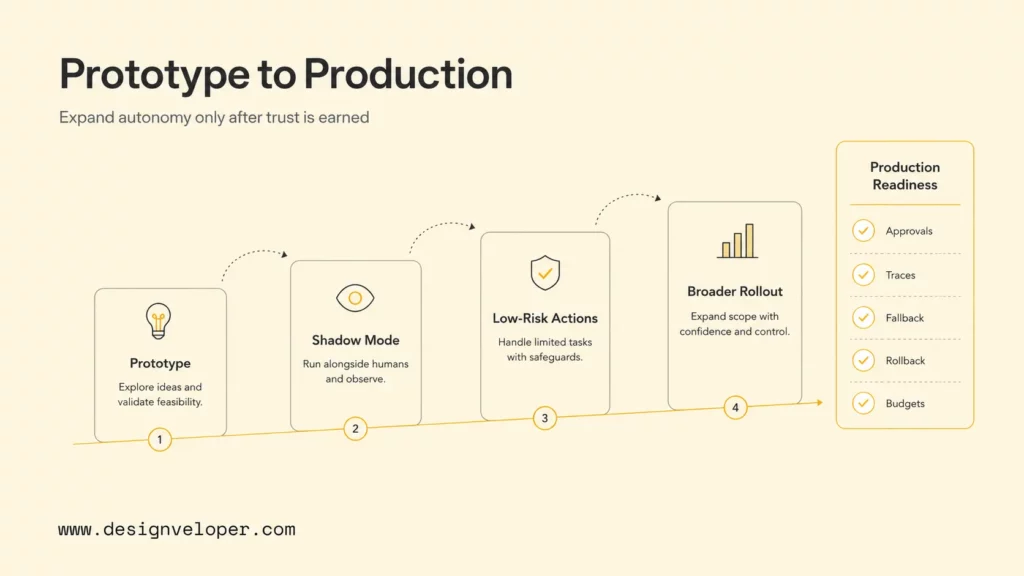
A prototype shows that agents can collaborate. Production requires repeatable outcomes, bounded authority, observable transitions, controlled change, and an owner who can pause or repair the workflow.
- Start in shadow mode: generate recommendations while the existing process remains in control.
- Allow only low-risk, reversible actions for a small group of users.
- Expand tools, autonomy, and traffic only after evaluation and incident data support the change.
- Keep a human or single-agent fallback that can handle the same request.
- Test pause, downgrade, replay, reconcile, rollback, and retirement paths.
A production readiness review should confirm that every agent has one purpose, owner, identity, tool set, and permission scope. Every handoff and state update should have a validated schema. Routing, budgets, retries, escalation, sensitive-action approval, and end-to-end traces should be explicit.
For teams that need a custom workflow, contact Designveloper about AI development services with the agent responsibility map, handoff contracts, shared-state rules, failure behavior, and approval points defined alongside the product workflow. The system should pass failure-injection checks for unavailable tools, contradictory outputs, duplicate events, and partial completion before more agents are added.
Teams that connect agents to business systems can also compare the design with AI business process automation, especially when the main value comes from reducing manual handoffs rather than adding another conversational interface.
The right architecture often combines agents with conventional services. Let code validate money, permissions, schemas, and state transitions. Let agents handle ambiguous language, planning, retrieval, and specialist reasoning inside those boundaries. Orchestration creates value when agentic behavior reduces a measured workflow problem.
Further reading:
- What Are AI Agents? How They Work And Examples In Business
- 15 Best AI Coding Assistant Tools For Developers In 2026
- Agentic AI Architecture: Components, Workflow, Design Patterns
FAQs About AI Agent Orchestration
When Should You Use Multiple AI Agents Instead Of One?
Use multiple agents when the workflow needs distinct specialties, independent parallel work, dynamic routing, separate tools or permissions, isolated context, or a formal worker-reviewer loop. Use one agent when one role can complete the task reliably with one coherent context. Multi-agent design should solve a measured limitation.
What Is The Difference Between Orchestration And Choreography?
Orchestration gives one coordinator responsibility for routing, shared progress, approvals, and completion. Choreography lets agents or services react to events and make local decisions without one coordinator controlling every transition. Choose orchestration when one owner must see the whole run; choose choreography when independent domains need local control and asynchronous events.
Which Framework Is Best For AI Agent Orchestration?
No framework is best for every workflow. LangGraph fits explicit stateful graphs, CrewAI fits role-based crews and structured flows, AutoGen fits conversational teams and handoffs, Semantic Kernel fits Microsoft-oriented pattern abstractions, and LlamaIndex fits data-intensive workflows. Choose after testing state, observability, deployment, recovery, version stability, language support, and team fit.
How Do AI Agents Share Context And Memory?
Agents should share validated, structured workflow state instead of full transcripts by default. Each worker receives the fields, evidence, and history required for its role. Store long-term memory separately with a source, confidence, owner, retention rule, and correction path. Filter sensitive data before it enters another agent’s context.
What Are The Biggest Risks Of Multi-Agent Orchestration?
The main risks are poor decomposition, wrong routing, handoff loops, uncontrolled context, permission sprawl, conflicting actions, partial tool failures, cost and latency growth, model regressions, and incomplete monitoring. Reduce them with typed contracts, least privilege, policy gates, budgets, stop conditions, end-to-end traces, evaluations, and tested recovery.
Conclusion: Keep AI Agent Orchestration Bounded
AI agent orchestration is a product and operations decision, not only a framework choice. Start with one workflow, measure the baseline, keep authority narrow, and add specialist agents only when they improve reliability, coverage, or control. That approach makes the system easier to explain, test, and operate as it grows.
Also published on

Share post on










Related Articles


AI Agents vs Agentic AI: Differences From Execution to Autonomy
AI Agents vs Agentic AI: Differences From Execution to Autonomy Published October 30, 2026
Best AI Trading Bots For Crypto & Stocks In 2026 (We Tested Them All)
Best AI Trading Bots For Crypto & Stocks In 2026 (We Tested Them All) Published October 30, 2026
Claude Vs ChatGPT Vs Gemini For Coding In 2026: Which Is Best?
Claude Vs ChatGPT Vs Gemini For Coding In 2026: Which Is Best? Published October 29, 2026


















