
















Is LangChain Bad? Developer Complaints, Pros, And When To Use It

KEY TAKEAWAYS:
- LangChain is a framework, not a requirement for every LLM application. Its value depends on how much integration and orchestration the product needs.
- Start with the smallest workflow that works. A single model call may need only a provider SDK; branching, retrieval, tools, and state can justify more structure.
- Separate framework risk from application risk. Types, permissions, data access, evaluation, and safe tool use remain the product team’s responsibility.
- Set a production exit check for every prototype. Measure calls, tokens, latency, retrieval quality, and upgrade effort before keeping or removing framework layers.
An LLM feature can start as one request and grow into retrieval, tool calls, retries, and approvals. That growth changes what a team needs from its framework: fewer moving parts at first, but clearer orchestration and controls when the workflow expands. This review examines the engineering trade-offs behind the “LangChain is bad” claim, compares it with direct provider SDKs and LangGraph, and shows which checks matter before a prototype reaches production.
What Developers Mean When They Call LangChain “Bad”
Calling LangChain “bad” usually describes a poor fit between its abstractions and a specific application. It does not show that the framework cannot build useful LLM products. A simple request can become harder to follow if a team adds prompt objects, runnables, parsers, callbacks, and wrappers without reducing other work.
The same layers can help when a workflow connects several models, retrievers, tools, or approval steps. LangChain’s official overview presents it as a framework for building language-model applications and agents. The framework is useful when its shared patterns remove code the team would otherwise have to maintain.
“Bad” can also blur separate concerns. Extra abstraction is a framework choice. Unchecked model output, open tool permissions, weak tests, and exposed secrets are application design problems. Teams should identify which layer causes a failure before replacing the framework or blaming it for every production issue.
The criticisms in this article are an engineering taxonomy, not a ranked survey of developer opinion. Their impact depends on the chosen integrations, versions, workflow, and production requirements.
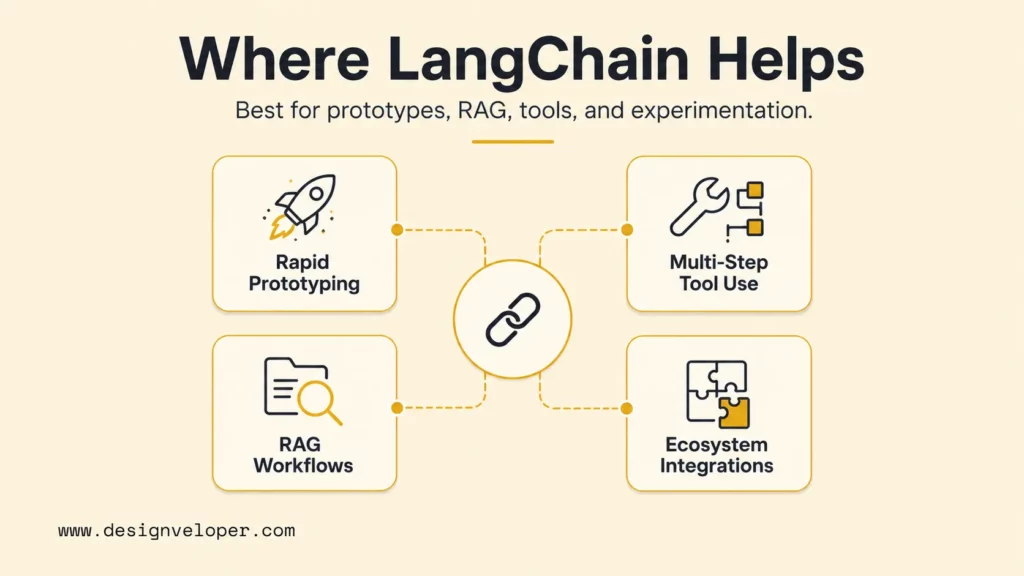
Where LangChain Adds Value
LangChain earns its place when reusable integrations or workflow components reduce the effort needed to explore and operate an LLM feature. The best signal is not the number of abstractions available; it is whether they make the application easier to change, observe, and test.
Prototyping Integrations Before the Architecture Is Settled
A prototype can connect a model, prompt, retriever, and output parser before the team knows which pieces will survive launch. That makes it useful for answering product questions: Does retrieval help? Does the model need a tool? Can users correct a draft? A focused prompt-engineering workflow can also help teams compare prompt versions without turning each experiment into production architecture.
For example, a support team might test whether an assistant can retrieve policy text, draft a reply, and route uncertain cases to a person. The prototype should log each stage and use a small set of representative questions. The team can then keep only the integrations and abstractions that improve the workflow.
Prototype speed is not proof of production readiness. Before launch, replace sample data, add input and output checks, define failure paths, and decide who owns upgrades. A clear AI agent architecture can make boundaries easier to inspect when the workflow grows beyond one prompt and one response.
RAG and Stateful Workflows With Several Moving Parts
LangChain can help assemble a retrieval-augmented generation workflow from document loaders, retrievers, models, and prompt components. Its LangChain RAG tutorial shows one way to connect these pieces. The framework does not decide whether the source documents are correct, whether access rules are enforced, or whether retrieved passages support the answer.
Tool-using applications can also benefit when they need branching, retries, saved state, or human review. LangGraph is a lower-level framework for long-running, stateful agent workflows; its official overview describes graphs that combine deterministic steps with model-driven actions. That is a different job from adding a wrapper around one model call.
Consider an internal assistant that searches approved policies, checks a case record, drafts a response, and asks a reviewer to approve it. A graph can make the steps and handoffs explicit. The application still needs scoped permissions, limits on each tool, and a safe fallback when retrieval or an external service fails.
For a deeper dive:
- Best AI Agent Frameworks For Building Smarter AI Systems
- AI Agent Orchestration: How Multi-Agent Workflows Work In Practice
- What Is Harness Engineering? How It Makes AI Agents Reliable
Production Trade-Offs and Practical Controls
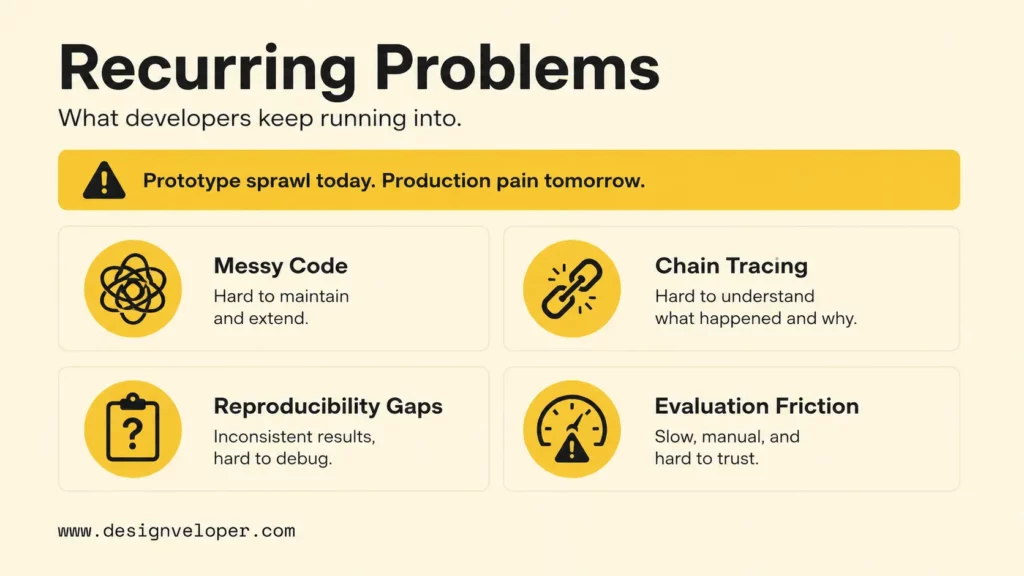
Production friction appears when a convenient prototype grows without clear boundaries. LangChain can be part of a stable service, but teams need to control dependency changes, data flow, model calls, and failure behavior around it.
- Abstractions and debugging: A failure can start in retrieval, prompt assembly, model settings, a tool, or output parsing. Add trace data for inputs, component versions, tool calls, errors, and latency, while avoiding sensitive payloads in logs.
- Dependencies and API changes: Integrations add packages and upgrade work. Pin tested versions, review release notes, and keep framework-specific code behind application-owned interfaces. Test upgrades against saved cases instead of copying an old tutorial unchanged.
- Types and output validation: Model responses are not safe business records by default. Validate structured outputs at the application boundary, reject invalid fields, and require human review before consequential actions.
- Evaluation and regressions: A trace shows where a request failed; an evaluation checks whether the final answer was acceptable. Keep versioned cases for correct-source retrieval, valid structured output, safe tool choices, and refusals when evidence is weak. Record model, prompt, package, and dataset versions for each run. Set a release threshold with the product owner, and block or roll back changes that fail high-risk cases.
- Calls, context, and cost: Extra model calls, large prompts, retrieved passages, and agent loops can raise cost and response time. Track call count, token use, retrieval size, and latency by workflow; a context-window limit is not a target for how much data to send.
- Security and permissions: Limit what tools can read or change, validate user-controlled inputs, and review dependencies. An agent should not receive broad access just because the framework makes a tool easy to attach.
Security advisories are version- and API-specific. GitHub’s advisory for CVE-2026-34070 describes path traversal in the legacy load_prompt and load_prompt_from_config APIs when an application loads user-influenced configuration; it lists versions before 1.2.22 as affected and 1.2.22 as patched. The CVE-2025-68664 advisory lists fixes in the 1.2.5 and 0.3.81 release lines. These findings do not make every LangChain application vulnerable. Check the advisory conditions and the resolved package in the project lockfile.
For a deeper dive:
- RAG Best Practices Start Before Your Model Generates An Answer
- Advanced RAG Techniques For Production-Grade AI Search
- What Is RAG in AI? How Retrieval-Augmented Generation Works
LangChain vs Direct SDKs vs LangGraph: Which Fits?
Choose the smallest tool that meets the workflow’s needs. LangChain offers higher-level components and integrations; a provider SDK exposes direct model requests; LangGraph is designed for explicit, stateful orchestration. The products can be combined, so this is a choice about boundaries rather than a rule that one tool must replace another. See LangChain vs LangGraph vs Langflow vs LangSmith for how the wider ecosystem differs, and the LangChain vs MCP comparison for the separate tool-connectivity question.
| Workflow | Good starting point | Why it may fit | Main decision to validate |
|---|---|---|---|
| One model call with a structured response | Direct provider SDK | The request, response, and cost path stay visible | Input checks, output validation, timeouts, and retries |
| A prototype connecting models, retrievers, or several providers | LangChain | Reusable integrations can speed up workflow experiments | Which components earn their maintenance cost before launch |
| A long-running workflow with state, branches, retries, or human approval | LangGraph, with LangChain components where useful | Explicit workflow state and transitions suit orchestration | Permissions, checkpoint behavior, failure paths, and evaluation |
| Strict audit needs or a tightly bounded product | Either, behind application-owned interfaces | The team can isolate provider and framework changes | Whether logs, tests, and controls meet the product’s requirements |
Use the table as a starting point, then test the workflow with representative inputs. A simple application can still need strong validation and retries. A complex application can still use direct SDK calls for parts that do not need orchestration. Teams comparing what an LLM agent is with a fixed model call should check whether the task truly needs model-selected tools or can follow a deterministic path.
A Safe Prototype-to-Production Path
A prototype should answer a product question and leave behind evidence for the next architecture choice. Before launch, turn the promising path into a service with explicit inputs, permissions, tests, monitoring, and an owner for upgrades.
- Define one job and its baseline. Name the user, input, useful output, and failure that matters. Keep a small evaluation set with expected behavior, including uncertain or malformed requests.
- Build the simplest working version. Start with one provider SDK call unless retrieval, tool use, or state is needed to answer the product question. If the prototype needs an integration, add only the components required for that test.
- Measure each stage. Record request duration, model-call count, token use, retrieval results, tool outcomes, and failed validations. Tracing tools such as LangSmith prompt management can help teams compare prompt versions; keep secrets and sensitive user data out of test traces.
- Draw application-owned boundaries. Convert framework outputs into domain types before storing data or taking action. Give each tool only the permissions it needs, add timeouts and limits, and define a safe fallback or human handoff.
- Review dependencies and upgrades. Pin versions, inspect release notes and security advisories, and rerun evaluation cases after changes. Keep a reason for each dependency so the team can remove components that no longer add value.
- Make a keep-or-remove decision. Compare the framework’s integration and orchestration value with its test, upgrade, and operating cost. Keep LangChain where it simplifies real workflow needs; replace thin wrappers with direct code when that makes the service easier to understand.
A team building a chatbot integration can test one end-to-end task: retrieve an approved answer, validate its source, and escalate when evidence is weak. A LangChain chatbot tutorial can help with a prototype, but the production version still needs application-specific access rules, tests, monitoring, and a recovery path.
Practical Verdict: Judge the Fit, Not the Label
LangChain is not inherently bad. It is a poor choice when the workflow is simple and its abstractions add more maintenance than value. It can be a useful starting point when integrations, retrieval, tools, or stateful steps reduce work that the team would otherwise build and operate itself. Decide with a small prototype, explicit measurements, and a production review—not a blanket verdict about the framework.
FAQs About LangChain
Is LangChain Actively Maintained?
The LangChain changelog records releases and updates, which is evidence of maintenance. It does not show how many developers use the framework or guarantee that an upgrade will be low-risk.
Can LangChain Increase Latency or Token Costs?
It can add work through integrations or orchestration, but cost and latency also depend on model calls, prompt size, retrieval, network requests, and tool loops. Measure each step in the target workflow instead of assuming the framework is the only cause.
Is LangChain Safe for Production Applications?
It can be used in production when the application pins and reviews dependencies, validates data, limits tool permissions, tests failures, and monitors behavior. Check each advisory against the exact API and version in the application; no framework alone makes a system secure.
How Is LangGraph Different From LangChain?
LangChain provides higher-level components for building LLM applications, while LangGraph focuses on long-running, stateful orchestration with explicit workflow steps. A team can use LangChain integrations inside a LangGraph workflow when both solve a real need.
Teams planning an LLM product can discuss its architecture, integrations, evaluation, and production boundaries through AI development services.
Also published on

Share post on










Related Articles


AI Agent Case Studies: 10 Real-World Examples Across Industries
AI Agent Case Studies: 10 Real-World Examples Across Industries Published October 21, 2026
How Will AI Affect Software Development? Complete Guide In 2026
How Will AI Affect Software Development? Complete Guide In 2026 Published October 21, 2026
How To Build A RAG System: Step-By-Step (New Guide)
How To Build A RAG System: Step-By-Step (New Guide) Published October 19, 2026


















