
















AI Chatbot Development: Types, Process, Costs In 2026

KEY TAKEAWAYS:
- AI chatbot development starts with a narrow business job, trusted data, clear authority boundaries, and measurable success criteria before model or platform selection.
- Different chatbot types solve different problems: menu, rule-based, AI-powered, voice, generative, RAG, and workflow-connected agents can be combined when the use case requires it.
- Production quality depends on the whole system, including knowledge pipelines, retrieval, prompts, integrations, permissions, human handoff, monitoring, and rollback controls.
- RAG and tool use need governance because stale sources, weak access control, prompt injection, unsafe actions, and poor fallback design can create business risk.
- A chatbot should be operated as a product with evaluation data, versioning, feedback loops, security review, usage analytics, and continuous improvement after launch.
An AI chatbot is easy to demo and much harder to operate when its answers, data access, and actions are not clearly bounded. The build must fit a real workflow. That means deciding what the assistant should know, what it may change, when it should ask for clarification, and how a person recovers when the conversation fails. These boundaries shape the chatbot type, technical architecture, development process, cost, and path to production.
Recommended for you:
- How To Build An AI Chatbot With Long-Term Memory?
- How To Train A Chatbot With Your Own Data For Better Business Support
- Best Conversational AI Platform for Enterprise Review
What Is An AI Chatbot?
An AI chatbot is a conversational interface that uses artificial intelligence to interpret a user’s message and decide what to say or do next. It can live in a website, mobile app, collaboration tool, messaging channel, contact center, kiosk, or voice system. Unlike a simple scripted widget, an AI chatbot can recognize linguistic variation, use context, search knowledge, generate responses, and sometimes call approved software tools.
The term covers several architectures. An intent-based bot classifies the user’s goal and fills required fields. A generative chatbot asks a large language model (LLM) to compose a response. A RAG chatbot first retrieves relevant passages from an approved knowledge source and supplies them as context. An agentic system can choose tools and execute multi-step work, such as looking up an order, checking a policy, and opening a support ticket.
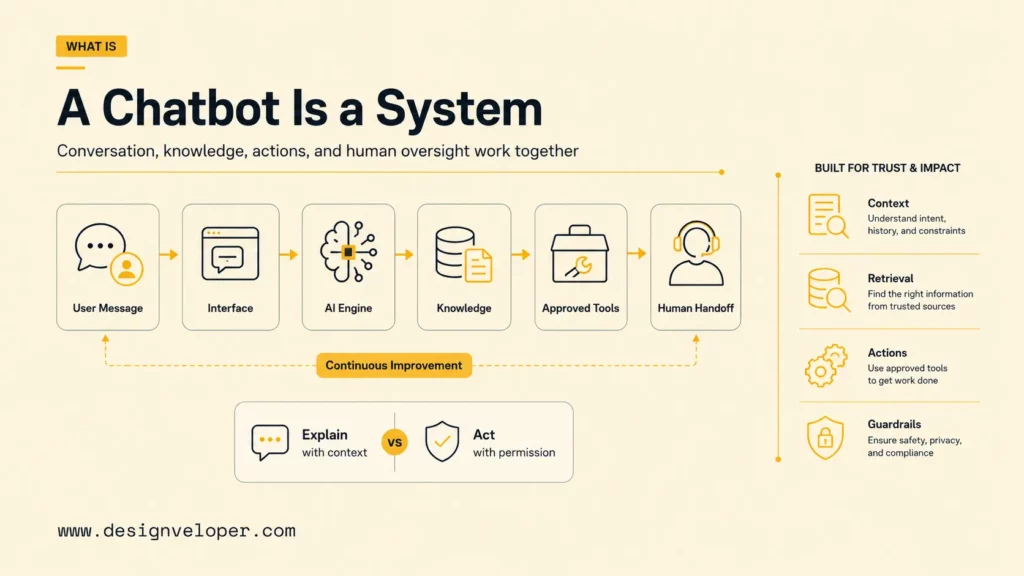
A chatbot is not only a model. The complete system includes the channel interface, identity, conversation state, prompts or flows, knowledge sources, retrieval, integrations, safety controls, observability, analytics, and human operations. Our guide to what a chatbot is and how it works explains this product view in more detail.
The most important distinction is between conversation and authority. A chatbot may be allowed to explain a refund policy but not approve a refund. It may draft a CRM note but require a person to confirm the update. Defining those boundaries early prevents a helpful interface from becoming an uncontrolled route into business systems.
Further reading:
- Conversational AI Vs. Chatbot: Key Differences And Use Cases
- AI Model: A Detailed Guide to Understanding & Building
- 10 Best Practices For Prompt Engineering With Any AI Model
Types Of AI Chatbots
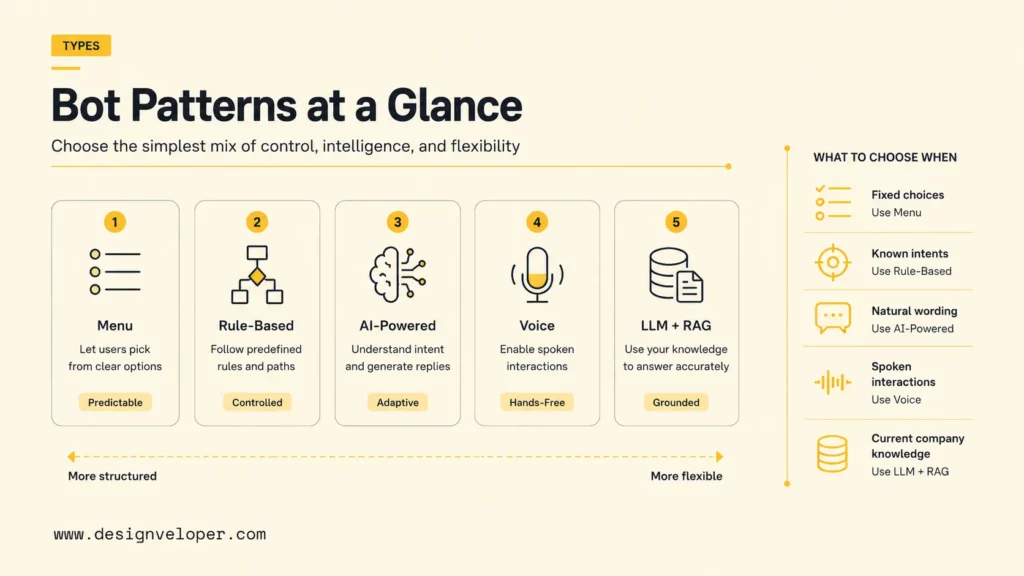
Chatbot types are better understood as building blocks than mutually exclusive products. The boundary between an assistant and an AI agent versus a chatbot matters when the system can take actions rather than only answer questions. A single assistant can use buttons for navigation, rules for compliance, intent recognition for routing, RAG for company knowledge, an LLM for natural wording, and tools for approved actions. Choose the simplest combination that reliably serves the use case.
Related reading:
- How To Build A RAG System: Step-By-Step (New Guide)
- What Is A Vector Database? A Practical Guide For AI Search And RAG
- Build A RAG Agent With LangChain: Step-By-Step Tutorial
Menu Or Button-Based Chatbots
Menu or button-based chatbots present predefined options such as Track an order, Change a booking, or Speak to support. They are fast, predictable, easy to analyze, and appropriate when the number of journeys is small. Because users select rather than describe an intent, the system does not need sophisticated language understanding.
Their weakness is rigidity. A customer may not see the right option, and long menu trees become frustrating. Keep choices short, show an escape route, preserve context when the user goes back, and offer free-text or human support when the menu cannot cover the request.
Rule-Based Chatbots
Rule-based chatbots follow conditions, decision trees, patterns, or workflow states. A rule may ask for an order number, validate its format, call an order API, and choose the next message based on status. These chatbots work well for eligibility checks, onboarding, troubleshooting, and regulated scripts where the permitted sequence is known.
Rules are transparent, but their maintenance cost rises as exceptions multiply. Document ownership for every flow, version rules, test edge cases, and remove obsolete branches. A hybrid design can keep high-risk decisions deterministic while using AI to interpret the user’s wording.
AI-Powered Chatbots
AI-powered chatbots commonly use natural-language processing to identify intent, extract entities, rank responses, or predict the next action. A user can write “my parcel still isn’t here” instead of selecting Delivery problem. The system maps the sentence to an intent and gathers details such as order number, location, or date.
The development challenge is representative data. Intent labels must be distinct, example utterances must cover real language, and ambiguous messages need clarification. Measure confusion between intents, not only overall accuracy, because a high aggregate score can hide serious failures in a small but important category.
Voice Chatbots
Voice chatbots add speech recognition and speech synthesis to the conversation system. They can support contact centers, appointment lines, field work, accessibility, and hands-free tasks. The flow must account for background noise, accents, names, numbers, interruptions, silence, and the higher cost of waiting during a spoken interaction.
Voice quality depends on the whole latency budget: audio capture, transcription, reasoning, retrieval, tool calls, response generation, and synthesis. Confirm critical values aloud, avoid long monologues, let people interrupt, and provide a clear transfer route when recognition or task completion fails.
Generative AI And LLM Chatbots
Generative AI chatbots use LLMs to create natural responses rather than selecting only from fixed text. They are useful for explanation, summarization, drafting, translation, and conversations that cannot be enumerated as a decision tree. They can also follow a tone, structure output, or call functions supplied by an application.
Generation introduces variability. The same prompt can produce different wording, and fluent output can still be unsupported. Production teams therefore need prompt versioning, evaluation datasets, output constraints, content policies, and monitoring. For a broader business framing, compare the chatbot workflow with AI chatbots for businesses before expanding the feature list. The OpenAI API guidance recommends pinned model versions and evaluations when consistent behavior matters, a principle that applies across model providers.
Our overview of generative AI and its business impact is useful when stakeholders need to separate the model’s content-generation ability from the application controls around it.
RAG Chatbots And Workflow-Connected AI Agents
RAG chatbots search an approved knowledge collection before generating an answer. Microsoft describes RAG as a way to make application data available to an LLM without first training the model on that data. The system creates searchable representations, retrieves relevant context for a question, and provides that context to the model. See Microsoft’s RAG architecture explanation for the underlying pattern.
RAG helps with private or frequently changing information, but retrieval quality is its own engineering problem. Documents must be parsed, segmented, labeled, updated, permissioned, and evaluated. The chatbot should show sources when useful and decline to answer when it cannot retrieve sufficient evidence. Our RAG chatbot production guide covers the journey from local prototype to deployed system.
Workflow-connected AI agents go beyond answers. They can call tools to look up records, create tickets, schedule appointments, update a CRM, or trigger an internal process. Each tool needs a narrow contract, least-privilege credentials, input validation, authorization, timeouts, logs, and confirmation for consequential actions. Teams building with a framework can use a LangChain chatbot implementation as a concrete way to separate conversation logic from tool contracts. The model may propose an action; the surrounding application must decide whether it is allowed.
AI Chatbot Use Cases For Business Workflows
Good AI chatbot use cases combine meaningful demand, accessible data, a tolerable error profile, and a measurable outcome. Customer support is common because teams can start with repetitive questions, knowledge retrieval, ticket triage, and order lookup. Lead qualification can collect needs and schedule a meeting. Ecommerce assistants can guide product discovery, explain policies, and help with orders. Internal assistants can search company knowledge, answer HR questions, summarize documents, and start approved workflows.
| Use case | Useful success measures | Essential control |
|---|---|---|
| Customer support | Containment, resolution, customer satisfaction, reopen rate | Human handoff with transcript and context |
| Lead qualification | Qualified-lead rate, booking completion, sales acceptance | Consent, validation, CRM deduplication |
| Ecommerce guidance | Product discovery, assisted conversion, return rate | Accurate catalog, price, inventory, and policy data |
| Internal knowledge assistant | Answer success, search time, citation use | Document-level access control and freshness |
| HR self-service | Case deflection, completion, employee satisfaction | Privacy, role boundaries, and escalation |
| Document Q&A | Grounded-answer rate, citation accuracy, abstention quality | Source provenance and permission-aware retrieval |
| Booking and workflow automation | Completion, error, cancellation, recovery rate | Confirmation, idempotency, audit log |
The strongest first use case is narrow enough to evaluate and valuable enough to change a real workflow. Use the table to define the outcome and control before choosing a model, then describe the user journey in enough detail to expose failure points.
Customer Support And Service Chatbots
A support chatbot can begin with delivery, returns, account, or troubleshooting questions from approved help content. After authentication, it may look up an order or create a ticket, but exceptions should reach a person with the transcript, user identity, retrieved sources, and completed steps attached. A customer service chatbot should therefore optimize resolution quality and recovery, not only containment.
Internal Knowledge And HR Chatbots
An internal assistant should answer from the latest approved HR, engineering, or operations material while preserving document-level permissions. A useful project can retrieve a policy, cite the source, explain a process, and abstain when documents conflict. HR self-service needs extra care around personal data, role boundaries, employee visibility, and escalation to a human case owner.
Ecommerce, Sales, And Booking Chatbots
Ecommerce and sales assistants can narrow product choices, collect lead requirements, explain trade-offs, or schedule a meeting. Booking assistants should collect only the required details, check availability through a narrow tool, confirm the selected slot, and expose a clear cancellation path. Catalog, inventory, CRM, and calendar data must be current enough for the promised task; the chatbot should not invent availability or make an irreversible change without confirmation.
Must-Have AI Chatbot Features
Must-have features should support the whole conversation lifecycle, not only the first generated reply. The right feature set depends on the use case, but most production assistants need:
- Conversation understanding and state: recognize intent, collect missing values, preserve context, and ask focused clarification questions.
- Grounded knowledge: use an owned knowledge base or RAG layer with citations, freshness rules, source provenance, and permission-aware retrieval.
- Safe actions: expose narrow tools with authorization, input validation, timeouts, idempotency, audit logs, and confirmation for consequential changes.
- Failure recovery: detect uncertainty, avoid repetitive loops, explain limitations, and transfer to a person with useful context.
- Security and privacy: minimize personal data, enforce identity and access controls, protect secrets, filter outputs, and monitor misuse.
- Evaluation and operations: capture traces, retrieval results, latency, cost, feedback, safety events, and business outcomes so the team can improve the system.
Prioritize recovery paths early. A chatbot that recognizes uncertainty, asks a useful question, preserves context, and transfers gracefully is more valuable than one that attempts every request. Google documents human handoff as a deliberate transfer from a virtual agent to a person. Its Dialogflow handoff guidance shows that the application still needs procedures for what happens after the handoff signal.
Key Technologies Behind AI Chatbot Development
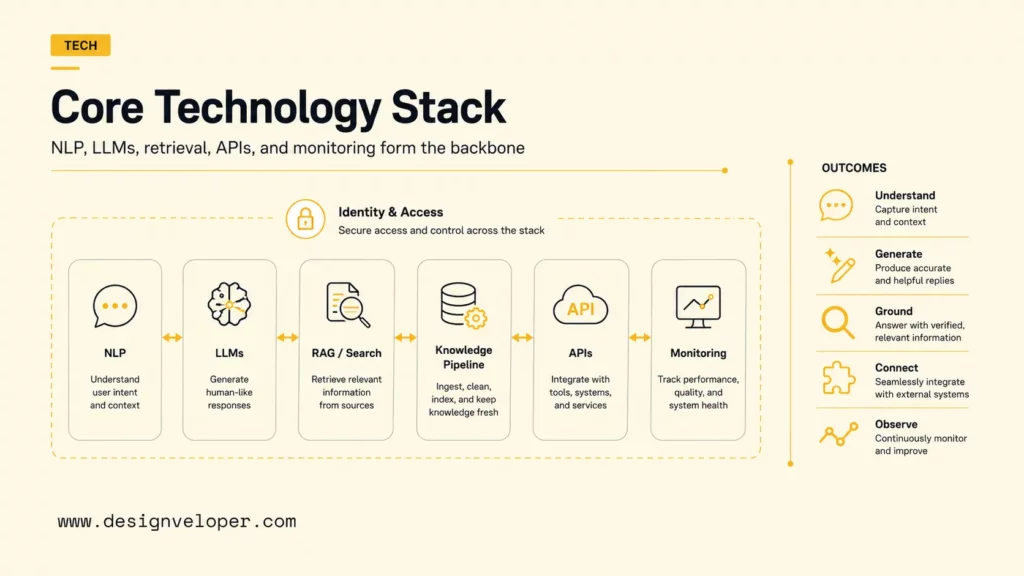
AI chatbot development combines conversation design with several technical layers. Natural-language processing handles intent recognition, entity extraction, classification, and language normalization. LLMs support flexible generation and reasoning. RAG and vector or hybrid search retrieve relevant knowledge. Document pipelines ingest, clean, split, label, embed, index, update, and delete source material.
- NLP and intent recognition: route predictable requests, extract required values, and identify when the bot needs clarification.
- LLMs and generative AI: produce explanations, summaries, drafts, and structured outputs under application constraints.
- RAG and search: ground responses in selected company sources and return evidence relevant to the current question.
- Knowledge pipelines: preserve ownership, metadata, freshness, permissions, version, and deletion across indexed content.
- APIs and integrations: read or update CRM, helpdesk, ecommerce, booking, HR, payment, and operational systems.
- Analytics and monitoring: capture traces, retrieval results, model use, latency, cost, errors, user feedback, and business outcomes.
Identity and authorization sit across every layer. A user’s access must be checked before retrieval and before any tool call. Microsoft warns that multitenant RAG systems must ensure tenants and individual users can only incorporate grounding data they are authorized to access; the secure multitenant RAG architecture explains this boundary.
The architecture should also support provider change. Keep business rules, evaluation data, prompts, retrieval, and integration contracts outside a single opaque interface where practical. Models and prices change; the organization should be able to test an alternative without redesigning the entire product.
The model writes the sentence, but the product architecture decides what the sentence may know, claim, and change.
For practical examples, check out:
- Prompt Engineering For Developers: A Guide To Practical Patterns
- RAG Best Practices Start Before Your Model Generates An Answer
- AI Voice Agent For Customer Service: Use Cases, Workflow, And Risks
AI Chatbot Development Process
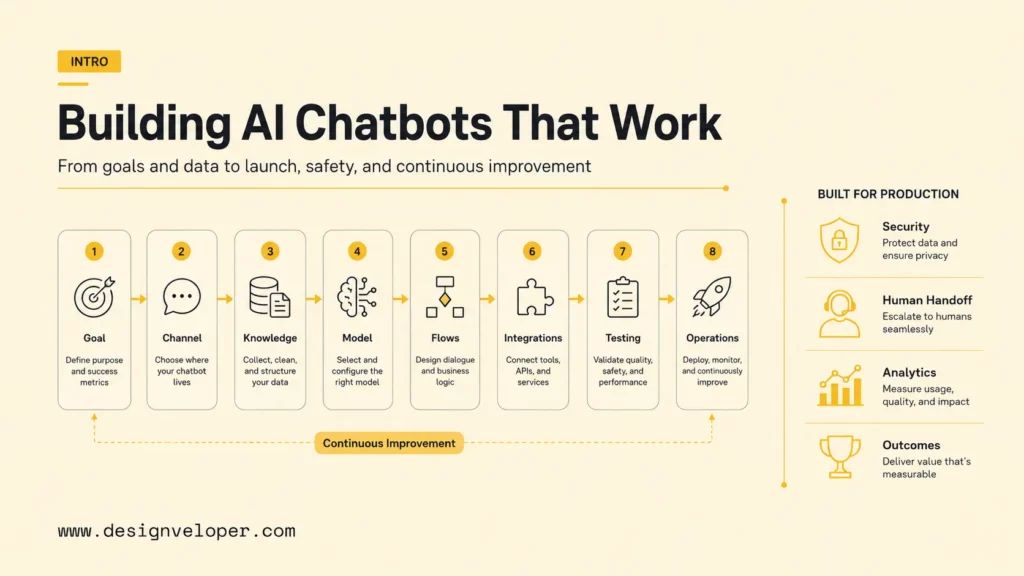
A reliable AI chatbot development process moves from goals to channels, knowledge, architecture, conversation design, integrations, evaluation, and operations. Each step should produce a reviewable artifact and a measurable acceptance criterion. This reduces the risk of an impressive demonstration that cannot survive production.
Explore more:
- A Practical Guide To AI Agent Architecture With Diagrams
- How To Build And Use AI Business Process Automation Effectively
- What Is AI Automation? How It Works, Benefits, Tools, and Use Cases
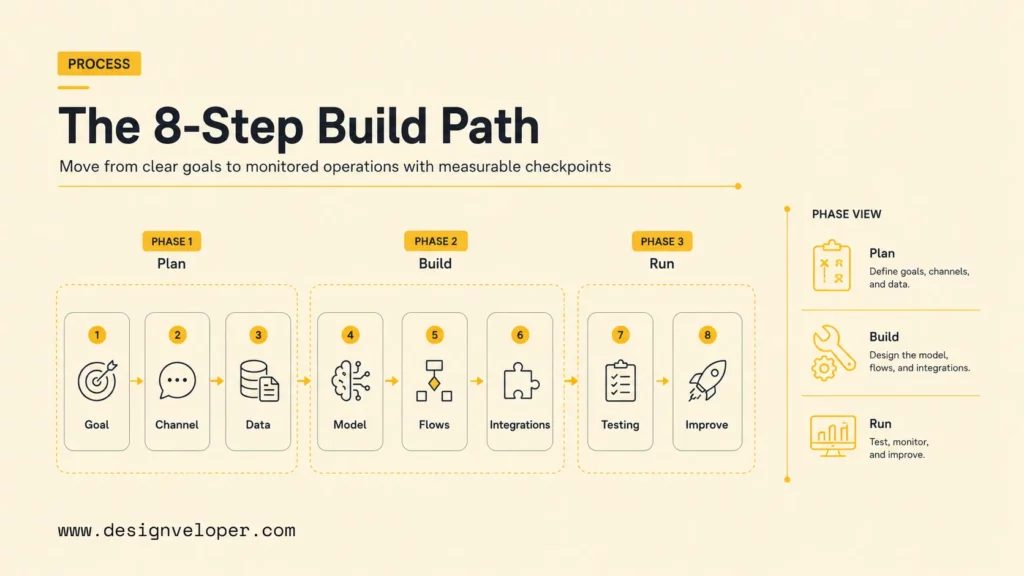
Step 1. Define The Chatbot Goal And Success Metrics
Every stage produces evidence for the next: a metric, data con…97 tokens truncated…e goal. “Help signed-in customers understand delivery status and solve common delivery problems, while transferring exceptions to support” is specific enough to design and evaluate.
Select outcome metrics and guardrails. Outcome metrics may include task completion, resolution, qualified leads, bookings, search time, or support effort. Guardrails may include grounded-answer rate, unauthorized disclosure, escalation quality, latency, abandonment, cost per conversation, and customer satisfaction. Define baseline, target, owner, and review cadence before development.
Step 2. Choose The Deployment Channel
Choose the channel where the target user already works and where the job can be completed. A website is appropriate for visitors and customers. A mobile app can use signed-in context. Slack or Microsoft Teams can serve internal users.
WhatsApp or other messaging channels may suit service notifications. Voice is appropriate when hands-free access or phone support matters.
Channel choice affects identity, message length, buttons, file support, session duration, notifications, approval, analytics, and handoff. Do not copy the same interface everywhere. Start with one primary channel. Validate the operating model before adding channels.
Step 3. Prepare The Knowledge Base And Data Sources
Inventory every source the chatbot may use: help-center articles, product data, policies, manuals, contracts, tickets, CRM fields, database records, or internal documents. For each source, record its owner, authority, update frequency, sensitivity, access rule, retention requirement, and deletion path. Duplicate or contradictory sources must be resolved before indexing.
Prepare documents for retrieval by cleaning boilerplate, preserving headings, splitting content into meaningful units, attaching metadata, and testing representative queries. Freshness is an operational requirement, not a one-time migration task. Build change detection and reindexing so the chatbot does not keep answering from retired policies.
Step 4. Choose The Model, Platform, Or Development Approach
Evaluate three routes: configure an off-the-shelf chatbot platform, build on a model or cloud platform, or create a custom application. A platform can launch faster for standard support flows. A custom AI chatbot development approach provides more control over identity, retrieval, workflows, user experience, and observability, but requires engineering and long-term ownership.
Test candidate models on your tasks rather than generic leaderboards. Compare answer quality, instruction following, tool use, language coverage, latency, context limits, data-handling terms, regional availability, price, and operational controls. Our review of AI chatbot platforms can help teams form an initial shortlist, but a representative evaluation set should decide the result.
Step 5. Design Conversation Flows, Prompts, And Fallbacks
Map the happy path, missing information, ambiguity, unsupported requests, user corrections, system errors, and escalation. Write prompts that define role, scope, source use, response format, uncertainty, tool rules, and prohibited behavior. Keep business rules in code or configuration when they must be deterministic. Add chatbot automation tools only after the fallback and approval paths are explicit.
A useful fallback does more than apologize. It can ask one focused question, offer valid choices, explain a limitation, show relevant help, or transfer with context. Set loop limits so the chatbot does not repeat the same failed response. Conversation designers, domain owners, support staff, and engineers should review high-volume and high-risk flows together.
Step 6. Integrate Business Systems And Human Handoff
Define each integration as a narrow capability: look up order, create ticket, search customer, book slot, or update preference. Use server-side credentials, validate inputs, check the user’s authorization, apply rate limits, make repeated requests safe, log outcomes, and handle timeouts. Require explicit confirmation before actions that spend money, change records, cancel services, or affect another person.
Human handoff needs routing rules, queue ownership, availability, service level, transcript transfer, customer identity, and a recovery path if no agent is available. A person should see what the chatbot understood, which sources it used, and which steps already occurred. Our AI chatbot integration guide explains how integrations and handoff fit the implementation lifecycle.
Step 7. Test Accuracy, Safety, Latency, And User Experience
Build evaluation sets from real, de-identified questions and expert-designed edge cases. Cover common requests, rare but costly cases, ambiguous language, spelling errors, and multilingual input. Also test unsupported topics, outdated sources, conflicting documents, prompt injection, data-extraction attempts, unsafe requests, integration failures, and adversarial tool instructions.
Score components separately: intent classification, retrieval relevance, source correctness, groundedness, task completion, tool-call validity, safety, latency, and user experience. OpenAI’s evaluation guidance supports repeatable criteria and datasets; the broader lesson is to run regression evaluations whenever prompts, models, retrieval, data, or tools change.
Test with people as well as automated graders. Domain experts find factual and policy errors. Security teams examine misuse. Support staff see escalation problems. Accessibility testing reveals interaction barriers. Load and failure testing expose behavior that a small demo cannot show.
Step 8. Deploy, Monitor, And Improve Continuously
Release gradually with an internal pilot, limited audience, or small traffic percentage. Version prompts, retrieval settings, models, tools, and knowledge indexes. Keep rollback controls. Google recommends versioning, error handling, retries, load testing, and audit logs for production conversational agents in its Dialogflow service best practices.
Monitor user outcomes and system behavior: conversation volume, completion, fallback, escalation, unresolved intents, source use, retrieval gaps, model errors, tool failures, latency, token or inference cost, safety events, and feedback. Review failed conversations with privacy controls, convert patterns into test cases, fix the responsible layer, and prove the change through regression evaluation.
AI Chatbot Development Cost And Timeline
AI chatbot development cost is shaped less by the first prompt than by the system around it. A configurable FAQ bot can be relatively small. A secure assistant that retrieves private records, calls business tools, supports multiple channels, and transfers work to staff needs more discovery, engineering, testing, and operations.
- Scope: number of use cases, languages, channels, user roles, and expected conversation volume.
- Knowledge: document cleanup, retrieval, citations, freshness, permissions, and source ownership.
- Integration: APIs, authentication, authorization, workflow rules, confirmations, reconciliation, and audit logs.
- Operations: model and cloud usage, monitoring, evaluation, incident response, human support, and maintenance.
A narrow proof of concept may take weeks. A production pilot often takes longer because the team must prepare data, connect systems, run safety and quality evaluations, complete user testing, and define ownership after launch. Use a task-based estimate that includes discovery and post-launch operations; the broader AI app development cost model is useful for checking what a chatbot estimate may leave out.
Common Challenges In AI Chatbot Development
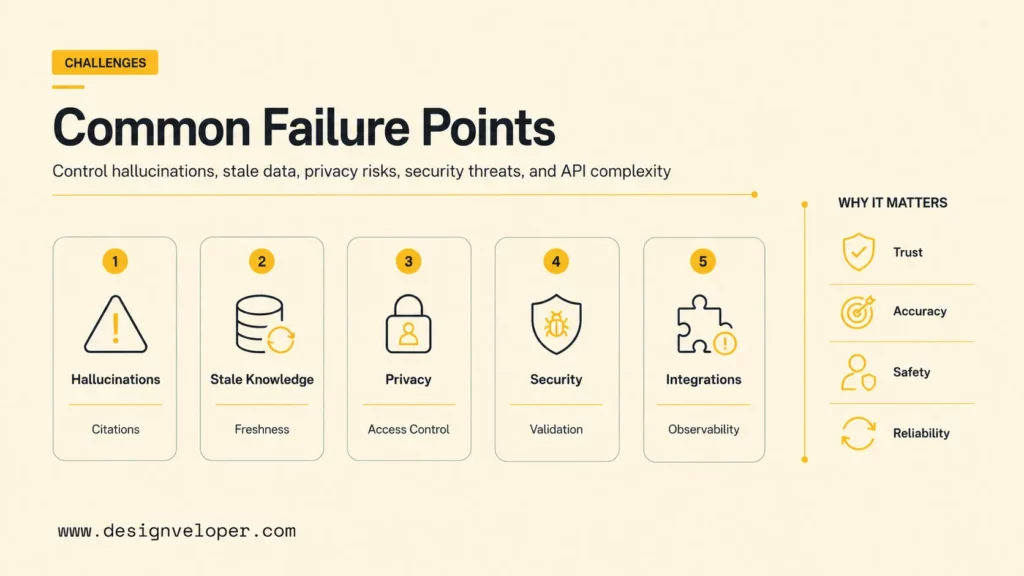
The first challenge is hallucination: a model can produce a confident response that is not supported by the available evidence. Ground important answers in controlled sources, require citations where appropriate, set abstention rules, and evaluate unsupported claims. The guide to AI hallucinations is a useful companion for designing those tests. RAG reduces some knowledge problems but does not guarantee correctness when retrieval is poor or source material conflicts.
Outdated knowledge is a pipeline failure. Assign source owners, freshness targets, update triggers, expiry rules, and deletion workflows. Weak fallback design creates another failure mode: the chatbot repeats itself, hides uncertainty, or blocks access to a person. Treat clarification and escalation as primary product journeys.
Privacy and access control must apply before data reaches the model or retrieval context. Minimize personal data, document purpose and retention, and separate users, teams, or tenants. The UK’s Information Commissioner’s Office says its AI and data protection guidance addresses fair, lawful, transparent processing and organizational and technical risk controls. Legal requirements depend on jurisdiction, so involve qualified privacy and legal owners.
Security challenges include prompt injection, sensitive-information disclosure, data or model poisoning, improper output handling, excessive agency, and unbounded resource use. The OWASP Top 10 for LLM Applications 2025 provides a practical threat catalog. Use layered controls: isolate instructions from untrusted content, restrict tools, validate outputs, apply least privilege, limit requests, monitor anomalies, and red-team the complete application.
Integration complexity and quality measurement often arrive late. APIs fail, schemas change, records duplicate, and downstream systems enforce rules the chatbot does not understand. Define contracts, safe retries, reconciliation, ownership, and observable errors. Then connect technical measures to user and business outcomes so improvement does not optimize a model score while harming the service.
What Production-Ready AI Chatbots Need Beyond A Prototype
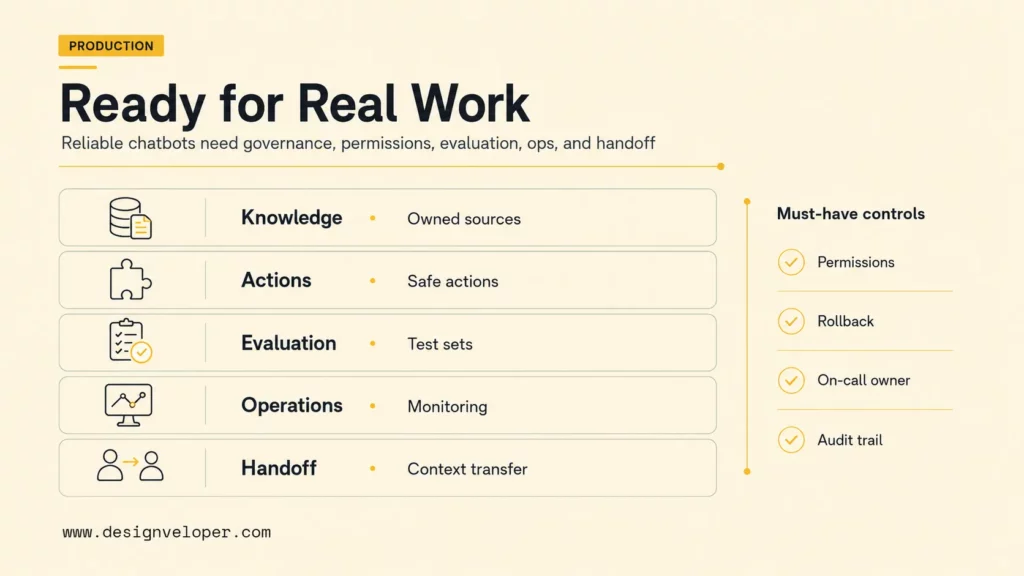
A production-ready chatbot needs reliability around the model. That includes permission-aware retrieval, identity, tool authorization, monitoring, feedback loops, escalation paths, versioning, incident response, and integrations with CRM, helpdesk, ecommerce, HR, booking, or internal systems. It also needs named people responsible for content, product outcomes, operations, security, and support.
NIST’s AI Risk Management Framework organizes AI risk work around governing, mapping, measuring, and managing risk. Its Generative AI Profile extends that approach for generative systems. A practical project can turn those ideas into an operating checklist. Document context and impact, test expected and harmful behavior, assign control owners, record residual risk, and review changes throughout the lifecycle.
Production-readiness scorecard
| Gate | Evidence | Stop signal |
|---|---|---|
| Knowledge | Owned sources, freshness, permissions, citations, deletion | Answers use unowned or stale content |
| Actions | Authorization, validation, confirmation, idempotency, audit | The model can exceed the user’s authority |
| Evaluation | Representative test set, thresholds, regression history | Launch depends on anecdotal demos |
| Operations | Monitoring, on-call owner, rollback, incident and recovery runbooks | Failures are visible only through user complaints |
| Handoff | Routing, context transfer, queue owner, availability, SLA | The chatbot can trap a user in a failed loop |
Architecture decisions should reflect consequences. A public FAQ assistant can use broad content with conservative action scope. An employee assistant needs identity and document permissions. A financial, health, employment, or legal workflow may require stronger review, evidence, human decision-making, and jurisdiction-specific compliance. The safest feature is sometimes a deliberate refusal or transfer.
Designveloper team is a fit when the chatbot is part of a real business workflow rather than an isolated website widget. Our AI development services can connect product discovery, UX, knowledge architecture, RAG, CRM or helpdesk actions, ecommerce support, HR self-service, role-based access, cloud deployment, evaluation, and post-launch monitoring. Our software development services support the broader application and integration work that production AI depends on.
A chatbot is production-ready when the organization can explain what it knows, what it may do, how it fails, and who responds.
FAQs About AI Chatbot Development
How Long Does AI Chatbot Development Take?
A narrow proof of concept can take a few weeks. A production assistant usually takes longer because data preparation, integrations, evaluation, security review, user testing, and operating procedures matter more than the first conversation demo. A focused FAQ or internal RAG pilot may take roughly one to three months; a multi-channel, workflow-connected product can require several months and ongoing iteration. Scope, source quality, system access, compliance, and stakeholder availability determine the timeline.
How Much Does It Cost To Develop An AI Chatbot?
Cost depends on whether the team configures a platform or builds a custom application, plus the number of channels, models, documents, integrations, languages, security controls, and support requirements. Include discovery, UX, development, data preparation, evaluation, cloud services, model usage, observability, vendor licenses, maintenance, and human operations. Estimate cost per successfully completed task, not only cost per message, because a cheap response that creates a support case is not economical.
What Data Is Needed To Build An AI Chatbot?
Intent-based chatbots need representative user utterances and clear labels. RAG chatbots need authoritative documents or records with ownership, structure, permissions, and freshness. Workflow assistants need API schemas, test accounts, business rules, and safe sample cases. Every project needs an evaluation set containing common, ambiguous, unsupported, sensitive, and adversarial requests. Remove unnecessary personal data and preserve a lawful basis and retention policy where personal data is used.
Can I Build An AI Chatbot For Free?
You can build a small prototype with free tiers, open-source components, or local models, but production is not free. Hosting, model inference, search, storage, channels, monitoring, security, integration maintenance, evaluation, and human support all create costs. A free prototype is useful for proving a conversation and testing data readiness; it should not be treated as proof that the production operating model is affordable or safe.
Which Channel Should An AI Chatbot Run On?
Start where the target user already performs the task. Use a website for public discovery and customer help, a signed-in app for account-specific work, or workplace chat for internal knowledge. Messaging may suit ongoing service, while voice fits phone or hands-free journeys.
Evaluate identity, privacy, interface capability, user expectation, handoff, and channel fees. Prove one channel first, then reuse the underlying conversation and integration services with channel-specific design.
Successful ai chatbot development starts with a narrow job, trusted data, explicit authority, and measurable outcomes. Choose the simplest architecture that meets the need, design human recovery before launch, evaluate every meaningful change, and operate the assistant as a product. When the use case requires custom workflows, secure integrations, RAG, or sustained improvement, our web application development team can help move from prototype to a maintainable production system.
Also published on

Share post on










Related Articles


Generative AI Applications: 20 Practical Use Cases Across Industries
Generative AI Applications: 20 Practical Use Cases Across Industries Published September 18, 2026
Machine Learning Vs AI: What’s The Difference?
Machine Learning Vs AI: What’s The Difference? Published September 16, 2026
Enterprise AI Agents: Use Cases, Tools, And Implementation
Enterprise AI Agents: Use Cases, Tools, And Implementation Published September 14, 2026



















